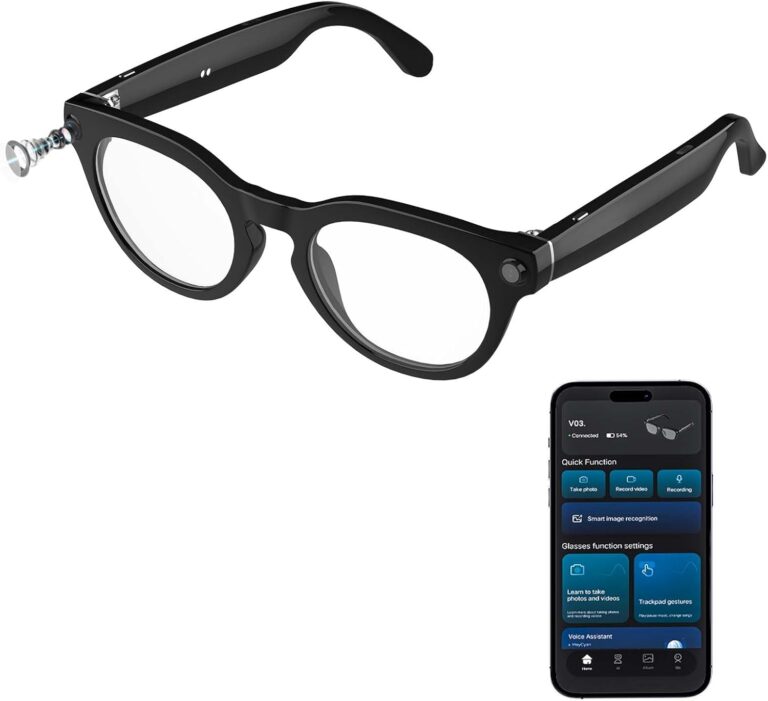
The Orpnkna AI Smart Glasses are smart glasses that combine three things in one wearable: an 8MP Sony camera (IMX219) for first-person photos and 1080p video, open-ear audio via speakers built into the temples, and an AI-powered companion app that can describe what the camera sees and answer questions using large language models (the transcript mentions ChatGPT and DeepSeek). The big idea is simple: instead of “AR glasses with a display,” these are camera + audio glasses that rely on your phone for AI features, recognition, and syncing.
In day-to-day use, the most compelling feature isn’t the camera itself—it’s the ability to snap what you’re looking at and ask the AI for context, like identifying a plant or describing a scene. That makes the Viewmate feel more like a practical “assistive/lookup tool” than a pure content-creation gadget.

Design, comfort, and what’s in the box
Physically, the Viewmate look like typical smart audio glasses: the arms are thicker than normal eyewear to house speakers, microphones, and electronics, but the transcript describes the overall weight/bulk as not too bad compared to similar products. The finish is a shiny piano black that looks sleek, but it picks up fingerprints and smudges easily, so you’ll be wiping them often.
In the box (per the transcript), you get the glasses, a soft microfiber-lined case (plus an additional carrying bag), lens inserts in a sunglass style for brighter outdoor conditions, and a microfiber cleaning cloth. Charging is done via a magnetic pogo-pin adapter rather than a standard USB‑C port on the glasses themselves.
Controls and hardware highlights
Control is split between buttons and a touchpad on the temple. You long-press the power button to turn them on/off, and you can press to take a photo; a separate button starts/stops video recording. The touchpad handles playback and volume gestures, and in testing it’s described as generally responsive and natural while worn.
Notable hardware points from the transcript include:
- 8MP Sony IMX219 sensor on the frame for first-person capture
- No microSD card slot, so storage is fixed and you manage it by syncing to the phone and clearing space
- No official IP rating mentioned, but described as generally rainproof and sweatproof (not for submersion)
- Visible status LEDs: blue when active; a white flash when taking a photo (good for transparency in public, but not ideal if you want stealth recording)
Battery life and charging
Charging takes about 1.5 hours (per the transcript). Battery is listed as 290 mAh. Real-world battery depends heavily on how you use them: the transcript claims up to ~9 hours for music listening, but more like 4–5 hours with frequent camera use, and roughly 6 hours “give and take” as a general figure before recharging.
The companion app experience (Hey Scan)
The Viewmate rely on the Hey Scan app (iOS/Android), connecting through Bluetooth and Wi‑Fi. Inside the app you can check battery, update firmware, change recording settings, and trigger photo/video/audio recording remotely.
A key recording detail: while the app supports long recordings (up to 30/60/120 minutes), it splits recordings into smaller clips for faster syncing. The transcript notes a practical limit where it’s set up to produce up to 12-minute segments, which reinforces that these are not intended to replace a GoPro for continuous action footage. They’re better for short clips, quick moments, and AI-assisted “what am I looking at?” use.
AI recognition: useful, fast, but not Google Lens
The standout feature is image recognition and AI Q&A: you can trigger recognition, the glasses snap a photo, and the app returns a description and context. In the transcript, response speed is described as pretty quick—a “split second” rather than long waits—and specifically contrasted favorably against early sluggishness seen in some other AI gadgets (mentioned: Humane AI Pin and Rabbit R1).
However, there’s an important limitation: the transcript suggests the model being used (ChatGPT/DeepSeek) doesn’t behave like it’s truly web-connected in the way Google Lens is. That means:
- It can do a good job describing what’s in the image and reading visible text (for example, it recognized a book title/author from a cover).
- It’s less helpful for barcodes/QR codes or “shopping lookup” tasks where Google Lens might return product pages, prices, or exact matches.
Where it shines, based on examples in the transcript, is plants/flowers, scenes, and general descriptive assistance—potentially valuable as a lightweight accessibility aid for users who want spoken context about what’s in front of them.
Translation, transcription, and “meeting minutes”
The translation and transcription tools are more capable than you’d expect from “just glasses,” because the app offers multiple modes:
- Simultaneous/on-screen translation that shows two languages side-by-side
- A conversation-style mode similar in feel to Google Translate, where you speak and it translates in real time
- A meeting minutes mode that records, transcribes with punctuation, generates a summary, and even provides a mind map view for visualizing the content (likely most useful with longer recordings)
The transcript also highlights that the microphones are surprisingly good: sensitive, handles faster speech reasonably well, and works nicely for calls, audio notes, and transcription.
Photo and video quality (set expectations)
If you’re buying these mainly as a camera, expectations matter. The transcript is clear that image quality won’t match a modern flagship smartphone. It’s described as more like a 2000s-style digicam look—usable, slightly “rustic/organic,” and good enough for documentation and AI recognition, but not for polished cinematics.
Key camera limitations noted:
- Limited dynamic range compared with phones and larger-sensor cameras
- Not very wide field of view (more like a regular phone camera than a GoPro fisheye)
- Little to no stabilization, so footage can look shaky while walking/jogging
- Fixed focus / no autofocus (very close-up macro shots won’t be as sharp; best sharpness a bit farther away)
- No real flash; the visible LED is a status/notification light rather than an illumination flash
In good light and with a steady head, it can look “decent enough,” and the hands-free perspective is genuinely useful for casual recording and capturing moments while your hands are busy.
Audio performance (open-ear speakers)
Audio is one of the more pleasantly surprising parts of the transcript. The open-ear speakers offer stereo separation, clear mids/highs, and low enough latency to watch YouTube/Netflix without obvious syncing issues. You won’t get big bass or audiophile quality, but it’s described as better than expected—and it helps that Padmate has prior experience making audio products.
Because the design is open, you’ll still hear your surroundings, which is good for safety and awareness but not ideal if you want isolation.
Pros and Cons (from the transcript)
Pros
- Interesting AI use case: snapping what you see and getting descriptive, spoken context back quickly.
- Responsive performance: recognition and assistant responses are fast enough to feel practical.
- Strong microphone features: good transcription, meeting summaries, and accessibility potential.
- Decent open-ear audio with minimal latency and easy playback controls.
- No subscription mentioned: AI/translation features are described as available without ongoing payments after buying the glasses.
Cons
- Video stabilization is weak, making it a poor choice for action footage or walking/running vlogs.
- No microSD expansion, so you’re managing fixed storage via phone syncing.
- AI recognition isn’t a full Google Lens replacement, especially for barcodes/QR codes and “web lookup” tasks.
- Shiny finish attracts fingerprints, and the visible recording lights can’t (per the transcript) be disabled in-app.
Who should buy these?
The Padmate Viewmate make the most sense for someone who wants hands-free snapshots, quick first-person clips, open-ear audio, and—most importantly—AI-assisted visual descriptions and translation/transcription through a phone-tethered experience. They’re also potentially compelling for accessibility scenarios where hearing a description of what’s in view is helpful.
If your priority is high-quality stabilized video, a dedicated action camera or a phone gimbal setup will be a better fit. And if you specifically want “identify this product and show me where to buy it,” you may find Google Lens-style tools more effective than the current AI recognition behavior described.